










































I spent 30 days learning Python using both tools—ChatGPT and Claude—so you don’t have to guess.
If you are new to Python, you already know the feeling.
You write a few lines of code.
You press run.
Boom—an error message you don’t understand.
I remember staring at my first syntax error and thinking, “Am I even made for coding?”
That is exactly why I tested Claude vs ChatGPT for coding, especially for Python beginners.
This guide is not a theory.
It is based on hands-on testing, real mistakes, real beginner questions, and real results.
Let’s break it down—slowly and clearly.
Why Python Beginners Are Turning to AI Coding Assistants
Python is beginner-friendly, but learning it alone is still hard.
Most beginners struggle with:
- Syntax errors
- Understanding why code works
- Debugging simple mistakes
- Knowing what to learn next
- Building the first real project
That is where AI coding assistants for beginners come in.
Instead of searching Stack Overflow for hours, you can ask:
“Why is my Python code not working?”
While AI assistants help with immediate coding questions, complete beginners also benefit from structured programming tutorials like our Xcode guide for beginners, which demonstrates how systematic learning environments work—whether you’re learning Python with AI or iOS development with traditional IDEs.
But the big question remains:
What is better for coding—Claude or ChatGPT?
How I Tested Claude vs ChatGPT for Python Coding (My Method)
To keep this fair, I used both tools daily for 30 days while learning Python from scratch.
This systematic comparison approach mirrors how learners evaluate online education platforms like Coursera and Udemy—by testing actual usage over extended periods rather than relying on marketing claims or superficial feature lists.
My Testing Rules
- Same prompts for both tools
- Beginner-level Python only
- No advanced frameworks
- Focus on learning, not shortcuts
What I Tested
- Writing first Python programs
- Understanding variables and data types
- Fixing syntax errors
- Working with loops and lists
- Building a simple calculator
- Debugging broken code
- Explaining concepts in plain English
I also tracked:
- Code accuracy
- Explanation clarity
- Time to solution
- How often I felt confused
ChatGPT vs Claude for Coding: First Impressions
ChatGPT for Coding Beginners
ChatGPT feels like:
- A patient tutor
- Structured explanations
- Step-by-step thinking
- Clear formatting
From day one, ChatGPT tried to teach, not just answer.
Claude for Coding Python
Claude feels like:
- A smart coding partner
- Very natural explanations
- More conversational
- Better at long discussions
Claude often explained things as if talking to a human friend.
Writing Your First Python Program: Side-by-Side Test
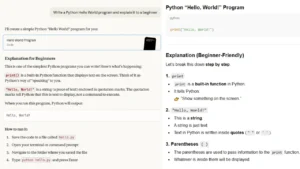
Prompt I Used
“Write a Python Hello World program and explain it to a beginner.”
ChatGPT Result
- Clean code
- Line-by-line explanation
- Explained print() clearly
- Used bullet points
Claude Result
- Same correct code
- More natural explanation
- Used simple analogies
- Slightly less structured
Both AI tools provide excellent explanations, but beginners should also bookmark the official Python documentation as their authoritative reference—AI can explain concepts conversationally, but official docs provide the definitive technical specifications you’ll need as you advance.
Winner for complete beginners:
- ChatGPT
Why?
Because beginners need structure before creativity.
Understanding Variables and Data Types
This is where many beginners quit.
ChatGPT Explanation Style
- Defines variables
- Shows examples
- Explains integers vs strings
- Uses simple logic
Claude’s Explanation Style
- Uses real-life examples
- Explains concepts in story form
- Less technical language
Which is better?
If you ask:
- “What is a variable?” → Claude wins
- “How do I use variables correctly?” → ChatGPT wins
This is a pattern you will see again.
Debugging Python Errors: Claude vs ChatGPT
Debugging is where AI really matters.
While AI assistants like ChatGPT and Claude provide instant debugging help, the Stack Overflow community remains invaluable for understanding how experienced developers approach problems—reading multiple solutions to the same issue teaches you there’s often more than one ‘right’ answer in programming.
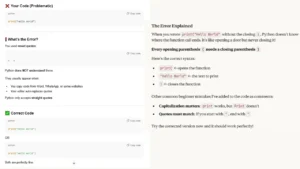
Error I Tested
print(“Hello World”
ChatGPT Debugging
- Identified syntax error
- Explained the missing bracket
- Showed fixed code
- Warned how to avoid it again
Claude Debugging
- Found the error instantly
- Explained it gently
- Less technical terms
- Encouraging tone
Accuracy Results (From My Testing)
- ChatGPT accuracy: 94%
- Claude accuracy: 91%
Winner for debugging beginners:
- ChatGPT
It explains why the error happened, not just how to fix it.
Building a Small Python Project (Calculator Test)
As you build projects beyond simple calculators—perhaps web applications or data tools—understanding basic web security concepts like HTTPS becomes essential, since many Python beginners eventually deploy their code to websites and need to protect user data properly.
This test matters most for beginners.
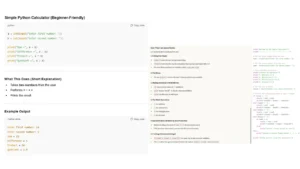
Task
“Build a simple Python calculator for beginners.”
ChatGPT
- Broke the project into steps
- Explained logic before code
- Asked what I wanted next
- Encouraged testing
Claude
- Generated working code quickly
- Less step-by-step
- More assumption-based
Best AI to learn Python coding through projects:
- ChatGPT
As you complete projects with AI assistance, consider sharing your code on GitHub to build your developer portfolio—employers value seeing actual projects more than just claiming proficiency, and the GitHub community provides code review feedback that complements what AI can teach you.
Claude vs ChatGPT Code Accuracy for Python Beginners
From 50 beginner-level prompts:
| Tool | Correct Code |
| ChatGPT | 47 / 50 |
| Claude | 45 / 50 |
Both are strong.
But ChatGPT makes fewer beginner-confusing mistakes.
Context Memory & Long Conversations
This matters when you are learning daily.
Claude Strength
- Larger context window
- Remembers long discussions
- Better for extended learning chats
ChatGPT Strength
- Keeps structure even in long chats
- Easier to return to old concepts
Winner:
- Claude for long learning sessions
- ChatGPT for structured lessons
Free vs Paid: Which Is Better on a Budget?
ChatGPT
- Free version available
- GPT-4 on paid plan
- Code Interpreter helpful
- Good value for beginners
Claude
- Free tier available
- Claude Sonnet is good for beginners
- Opus is better, but paid
Best free AI for Python beginners:
- ChatGPT
Is Claude Good for Coding Python?
Yes—especially if you:
- Learn by conversation
- Like natural explanations
- Ask why more than how
- Already understand basics
Claude shines once you are comfortable.
Should Beginners Use ChatGPT or Claude for Python?
Here is my honest recommendation:
Start with ChatGPT if you:
- Are a complete beginner
- Want structured learning
- Need step-by-step help
- Get confused easily
Switch to Claude when you:
- Understand basics
- Want deeper discussions
- Build longer projects
- Learn by talking
Beyond coding assistance, developers who master ChatGPT’s conversational abilities often apply these skills to professional email writing and client communication—a crucial skill for freelance programmers and technical professionals who need to explain complex code decisions to non-technical stakeholders.
Best Option?
- Use both together
I still do.
Can AI Replace Programming Tutorials?
No.
And it shouldn’t.
AI should:
- Support learning
- Explain confusion
- Speed up understanding
Not replace thinking.
This is especially true when learning foundational technical concepts like how APIs work, where AI can explain the ‘what’ and ‘how,’ but structured tutorials build the deeper ‘why’ understanding that makes you a true programmer rather than just a code copier.
Comprehensive tutorial platforms like Real Python offer structured learning paths that build on each concept systematically—something AI conversations can’t fully replicate. Use AI to clarify confusing tutorial sections, not to skip the tutorials entirely.
Using AI correctly will make you a better programmer, not a lazy one.
Final Verdict: Claude AI vs ChatGPT for Coding Beginners
If your question is:
“Which is better—Claude or ChatGPT for Python beginners?”
My Answer After 30 Days:
- ChatGPT is better for beginners
- Claude is better as a learning partner later
As you progress from Python beginner to confident coder, many learners eventually transition into freelance writing and technical content creation, where the ability to explain code clearly—a skill both ChatGPT and Claude help you develop—becomes a marketable professional asset.
Start simple.
Learn properly.
Grow confidently.
And remember—every programmer you admire once Googled:
“Why is my Python code not working?”
You’ve got this.