

































• About Us
  • Contact Us
  • Write for Us
  • Privacy Policy
  • Terms & Conditions
Tech News, Magazine & Review WordPress Theme 2017
  • Technology
    A perfectly arranged ergonomic home office desk setup in 2026 showing correct monitor height, chair posture, keyboard position, and neutral sitting posture for productivity and pain prevention

    Best Ergonomic Desk Setup for Home Office (Complete 2026 Guide)

    How Does Two-Factor Authentication (2FA) Work? A Simple Guide & Setup Checklist

    How Does Two-Factor Authentication (2FA) Work? A Simple Guide & Setup Checklist

    HDIntranet employee login screen concept showing secure corporate intranet dashboard on a laptop

    What Is HDIntranet? Complete Guide to hdintranet.com, Login Access, and Safety

    A laptop on a wooden desk showing an API interface screen, surrounded by a notebook, phone, and coffee mug – symbolizing how APIs connect different software tools, ideal for a beginner-friendly blog on APIs for non-programmers.

    Understanding APIs: A Guide for Non-Programmers

    Xcode tutorial for beginners showing the Xcode interface with Swift code and an iPhone simulator for building iOS apps

    Xcode Tutorial for Beginners — What It Is & How to Use It (2026)

    HTTP vs HTTPS diagram showing HTTP with SSL certificate creating a secure HTTPS connection

    Difference Between HTTP and HTTPS Explained: My Personal Guide

  • AI (Artificial Intelligence)
    Alt Text: A digital marketer using AI tools on a laptop to automate and optimize email marketing campaigns in 2026, with email analytics dashboard and AI interface on screen

    How to Use AI for Email Marketing Campaigns: A Step-by-Step Guide (2026)

    What is the Difference Between AI and Machine Learning?

    What is the Difference Between AI and Machine Learning?

    A determined female self-taught data scientist working at a home desk with a 2025 roadmap whiteboard, Python code on a monitor, and data visualization projects.

    How to Become a Data Scientist Without a Degree — Step-by-Step Roadmap & Portfolio Plans

    ChatGPT interface on mobile devices showing light and dark mode, illustrating how to use ChatGPT for writing clear and professional work emails faster

    How to Use ChatGPT for Email Writing (Faster, Clearer, More Human)

    ChatGPT vs Claude for Coding: Which Is Better for Python Beginners

    ChatGPT vs Claude for Coding: Which Is Better for Python Beginners?

    Matarecycler

    Matarecycler: Smart Recycling Solution Transforming Waste 2025

    Trwho.com Tech

    Trwho.com Tech: Guide to Its Features and Smart Uses in 2025

    Small Business Content Strategy

    7-Day AI-Powered Content Plan: Small Business Content Strategy

    AI to Write Content

    The Real Talk: How I Finally Got AI to Write Content That Sounds Like Me (And Doesn’t Get Flagged)

  • Digital Marketing
    A digital marketer writing SEO-optimized meta descriptions on a laptop with Google search results visible on screen, showing click-through rate analytics in 2026

    How to Write a Meta Description That Increases Clicks: A Complete Guide (2026)

    Alt Text: A digital marketer using AI tools on a laptop to automate and optimize email marketing campaigns in 2026, with email analytics dashboard and AI interface on screen

    How to Use AI for Email Marketing Campaigns: A Step-by-Step Guide (2026)

    A professional split-screen conceptual image showing a modern law firm building, a Google Map Pack interface with high rankings, and an attorney shaking hands with a client in a sunlit office, representing law firm growth through local SEO.

    Local SEO for Lawyers: The Complete 2026 Guide (That Actually Gets You Cases)

    A modern home office desk with a laptop showing AI writing software interfaces and a $50 budget icon, representing affordable AI blogging tools.

    AI Tools for Bloggers (Under $50/month): Affordable AI Writing Tools & Workflows

    Beginner blogger working on a laptop showing blog monetization strategies like ads, affiliate marketing, and digital products in 2026

    Blog Monetization for Beginners 2026: A Complete Guide

    Plumber working on plumbing systems with a Google My Business logo, illustrating the importance of local SEO for plumbers.

    How to Rank a Plumbing Business on Google (Complete Local SEO Guide)

    Dentist examining a patient in a dental clinic with a graphic showing Local SEO for Dentists 2026 and Google Maps growth

    Local SEO for Dentists: Complete Guide 2026

  • EdTech
    Split graphic comparing Coursera and Udemy logos with bold text reading "Coursera vs Udemy – Beginners Guide", highlighting a visual contrast between the two online learning platforms for a 2026 blog article.

    Coursera vs Udemy for Beginners (2026): Which Should You Choose?

  • Business
    Remote virtual assistant working from home office with laptop, planner and coffee, planning 90 day roadmap to start online business

    How to Become a Virtual Assistant from Home — Starter Guide & 90-Day Plan

    A collaborative backcasting room strategy meeting where a team plans future business goals using milestone mapping, human-focused SEO planning, and competitor analysis without AI-generated jargon.

    Backcasting: Strategic Planning Framework to Achieve Your Vision

    Woman working on a laptop at home while learning how to start a freelance writing business, with text overlay about a beginner freelance writing guide.

    How to Start a Freelance Writing Business (Beginner Guide 2026)

  • Software
    Split-screen comparison of free Photoshop alternatives in 2026 including Photopea, GIMP, Krita, and Darktable interfaces on a modern desktop monitor

    Free Photoshop Alternatives (2026) — Best Picks by Task & PSD Migration Tips

    Person transferring large files on laptop using modern cloud file sharing tools like WeTransfer and Google Drive, representing Files Over Miles alternatives in 2026

    Files Over Miles Alternatives (2026) — Fast & Free Large File Sharing Updated February 2026 | Beginner-Friendly

    Google Workspace for Small Businesses: Complete Setup Guide & Tips

    Google Workspace for Small Businesses: Complete Setup Guide & Tips

    Person holding two smartphones displaying Skillshare and MasterClass apps side by side, representing a detailed comparison of online learning platforms for skills, creativity, and career growth

    Skillshare vs MasterClass Comparison (2026): An Honest, Simple Guide for Real Learners

    Laptop on a desk displaying a Canva presentation editor with marketing strategy slides, showing how to create a presentation in Canva step by step.

    How to Create a Presentation in Canva (Simple Step-by-Step Guide)

    How to Use Notion for Project Management

    How to Use Notion for Project Management: A Simple Beginner Guide

No Result
View All Result
  • Technology
    A perfectly arranged ergonomic home office desk setup in 2026 showing correct monitor height, chair posture, keyboard position, and neutral sitting posture for productivity and pain prevention

    Best Ergonomic Desk Setup for Home Office (Complete 2026 Guide)

    How Does Two-Factor Authentication (2FA) Work? A Simple Guide & Setup Checklist

    How Does Two-Factor Authentication (2FA) Work? A Simple Guide & Setup Checklist

    HDIntranet employee login screen concept showing secure corporate intranet dashboard on a laptop

    What Is HDIntranet? Complete Guide to hdintranet.com, Login Access, and Safety

    A laptop on a wooden desk showing an API interface screen, surrounded by a notebook, phone, and coffee mug – symbolizing how APIs connect different software tools, ideal for a beginner-friendly blog on APIs for non-programmers.

    Understanding APIs: A Guide for Non-Programmers

    Xcode tutorial for beginners showing the Xcode interface with Swift code and an iPhone simulator for building iOS apps

    Xcode Tutorial for Beginners — What It Is & How to Use It (2026)

    HTTP vs HTTPS diagram showing HTTP with SSL certificate creating a secure HTTPS connection

    Difference Between HTTP and HTTPS Explained: My Personal Guide

  • AI (Artificial Intelligence)
    Alt Text: A digital marketer using AI tools on a laptop to automate and optimize email marketing campaigns in 2026, with email analytics dashboard and AI interface on screen

    How to Use AI for Email Marketing Campaigns: A Step-by-Step Guide (2026)

    What is the Difference Between AI and Machine Learning?

    What is the Difference Between AI and Machine Learning?

    A determined female self-taught data scientist working at a home desk with a 2025 roadmap whiteboard, Python code on a monitor, and data visualization projects.

    How to Become a Data Scientist Without a Degree — Step-by-Step Roadmap & Portfolio Plans

    ChatGPT interface on mobile devices showing light and dark mode, illustrating how to use ChatGPT for writing clear and professional work emails faster

    How to Use ChatGPT for Email Writing (Faster, Clearer, More Human)

    ChatGPT vs Claude for Coding: Which Is Better for Python Beginners

    ChatGPT vs Claude for Coding: Which Is Better for Python Beginners?

    Matarecycler

    Matarecycler: Smart Recycling Solution Transforming Waste 2025

    Trwho.com Tech

    Trwho.com Tech: Guide to Its Features and Smart Uses in 2025

    Small Business Content Strategy

    7-Day AI-Powered Content Plan: Small Business Content Strategy

    AI to Write Content

    The Real Talk: How I Finally Got AI to Write Content That Sounds Like Me (And Doesn’t Get Flagged)

  • Digital Marketing
    A digital marketer writing SEO-optimized meta descriptions on a laptop with Google search results visible on screen, showing click-through rate analytics in 2026

    How to Write a Meta Description That Increases Clicks: A Complete Guide (2026)

    Alt Text: A digital marketer using AI tools on a laptop to automate and optimize email marketing campaigns in 2026, with email analytics dashboard and AI interface on screen

    How to Use AI for Email Marketing Campaigns: A Step-by-Step Guide (2026)

    A professional split-screen conceptual image showing a modern law firm building, a Google Map Pack interface with high rankings, and an attorney shaking hands with a client in a sunlit office, representing law firm growth through local SEO.

    Local SEO for Lawyers: The Complete 2026 Guide (That Actually Gets You Cases)

    A modern home office desk with a laptop showing AI writing software interfaces and a $50 budget icon, representing affordable AI blogging tools.

    AI Tools for Bloggers (Under $50/month): Affordable AI Writing Tools & Workflows

    Beginner blogger working on a laptop showing blog monetization strategies like ads, affiliate marketing, and digital products in 2026

    Blog Monetization for Beginners 2026: A Complete Guide

    Plumber working on plumbing systems with a Google My Business logo, illustrating the importance of local SEO for plumbers.

    How to Rank a Plumbing Business on Google (Complete Local SEO Guide)

    Dentist examining a patient in a dental clinic with a graphic showing Local SEO for Dentists 2026 and Google Maps growth

    Local SEO for Dentists: Complete Guide 2026

  • EdTech
    Split graphic comparing Coursera and Udemy logos with bold text reading "Coursera vs Udemy – Beginners Guide", highlighting a visual contrast between the two online learning platforms for a 2026 blog article.

    Coursera vs Udemy for Beginners (2026): Which Should You Choose?

  • Business
    Remote virtual assistant working from home office with laptop, planner and coffee, planning 90 day roadmap to start online business

    How to Become a Virtual Assistant from Home — Starter Guide & 90-Day Plan

    A collaborative backcasting room strategy meeting where a team plans future business goals using milestone mapping, human-focused SEO planning, and competitor analysis without AI-generated jargon.

    Backcasting: Strategic Planning Framework to Achieve Your Vision

    Woman working on a laptop at home while learning how to start a freelance writing business, with text overlay about a beginner freelance writing guide.

    How to Start a Freelance Writing Business (Beginner Guide 2026)

  • Software
    Split-screen comparison of free Photoshop alternatives in 2026 including Photopea, GIMP, Krita, and Darktable interfaces on a modern desktop monitor

    Free Photoshop Alternatives (2026) — Best Picks by Task & PSD Migration Tips

    Person transferring large files on laptop using modern cloud file sharing tools like WeTransfer and Google Drive, representing Files Over Miles alternatives in 2026

    Files Over Miles Alternatives (2026) — Fast & Free Large File Sharing Updated February 2026 | Beginner-Friendly

    Google Workspace for Small Businesses: Complete Setup Guide & Tips

    Google Workspace for Small Businesses: Complete Setup Guide & Tips

    Person holding two smartphones displaying Skillshare and MasterClass apps side by side, representing a detailed comparison of online learning platforms for skills, creativity, and career growth

    Skillshare vs MasterClass Comparison (2026): An Honest, Simple Guide for Real Learners

    Laptop on a desk displaying a Canva presentation editor with marketing strategy slides, showing how to create a presentation in Canva step by step.

    How to Create a Presentation in Canva (Simple Step-by-Step Guide)

    How to Use Notion for Project Management

    How to Use Notion for Project Management: A Simple Beginner Guide

No Result
View All Result
Tech AI Tech
No Result
View All Result
Home AI (Artificial Intelligence)

How to Use ChatGPT for Email Writing (Faster, Clearer, More Human)

Ayaz Saifi by Ayaz Saifi
January 20, 2026
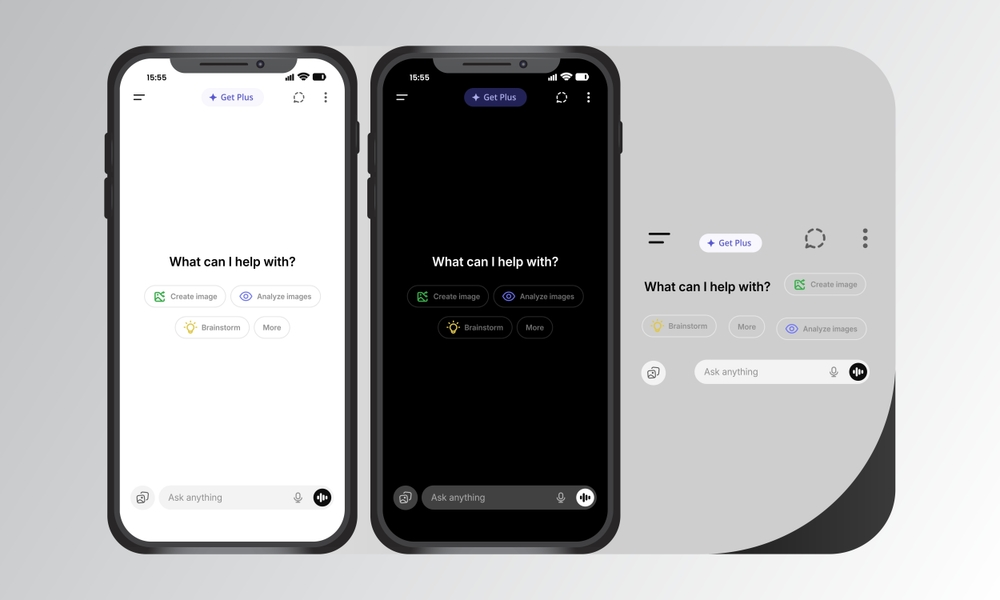
ChatGPT interface on mobile devices showing light and dark mode, illustrating how to use ChatGPT for writing clear and professional work emails faster
Share on FacebookShare on Twitter

Ever stare at an email draft and think, “This should be simple, why is it taking so long?”

If you create emails every day—sales, support, follow-ups, and internal updates—ChatGPT can save hours without sounding robotic. The key is understanding how to use it as an assistant, not an autopilot.

This article is written for small business owners, managers, office workers, founders, freelancers, assistants, & beginners to ChatGPT who need practical, secure, & repeatable email workflows.

Table of Contents

Toggle
  • The Fast Way to Write Better Emails
  • Why Use ChatGPT for Email Writing?
  • What ChatGPT Is Best (and Worst) At
    • Best at:
    • Not good at:
  • Practical Prompt Bank (Copy & Paste)
    • 1. Reply Writing
    • 2. Subject Line Generator
    • 3. Change Tone
    • 4. Follow-Up Email
  • Email Writing Workflows (Manual + Automated)
    • Gmail Workflow (Safe & Simple)
    • Outlook Workflow
    • Zapier / Make (Advanced, With Care)
  • Email Templates (Ready to Use)
    • 1. Cold Outreach
    • 2. Follow-Up
    • 3. Meeting Booking
    • 4. Apology Email
    • 5. Customer Support Reply
  • Prompt Engineering (Beginner-Friendly)
    • Bad Prompt 
    • Good Prompt
  • Mini Case Study: Before & After
    • Raw Draft
    • ChatGPT-Improved
  • Tools & Plugins (Know the Risks)
    • Risks to watch:
  • Ethics, Privacy and Safety (Significant)
  • Troubleshooting Common Problems
    • Output sounds robotic?
    • Wrong facts?
    • Does the tone feel off?
  • Conclusion
  • FAQs (Quick Answers)
    • Can ChatGPT write emails for work?
    • Is it safe for business emails?
    • Will recipients know it’s AI-written?
    • Can I automate emails fully?
    • Is ChatGPT the best for beginners?

The Fast Way to Write Better Emails

ChatGPT helps you write better emails faster when you give it clear context and always review before sending.

Quick workflow:

  1. Paste your rough draft + goal + audience.
  2. Ask ChatGPT to rewrite, then edit lightly and send.

Why Use ChatGPT for Email Writing?

Emails take time because you’re doing multiple things at once:

  • Thinking about tone
  • Worrying about clarity
  • Editing for mistakes
  • I don’t wish to sound rude, cold, awkward 

ChatGPT writes and revises your copy to save time on words and focus on decisions.

When I manage client communication myself, ChatGPT saves me more than 50% of my email writing time, mostly for repetitive emails like follow-ups and support replies.

What ChatGPT Is Best (and Worst) At

Best at:

  • Rewriting rough drafts
  • Improving tone (friendly, firm, polite)
  • Creating subject lines
  • Shortening long emails
  • Writing first drafts fast

Not good at:

  • Knowing private facts
  • Sending emails for you (good!)
  • Making judgment calls
  • Handling sensitive topics alone

Think of ChatGPT as a junior assistant who types fast but needs supervision.

Practical Prompt Bank (Copy & Paste)
Person using an AI assistant app on a smartphone, demonstrating practical ChatGPT prompts that beginners can copy and paste to write clearer and more professional emailsThese are beginner-friendly prompts you can reuse daily.

1. Reply Writing
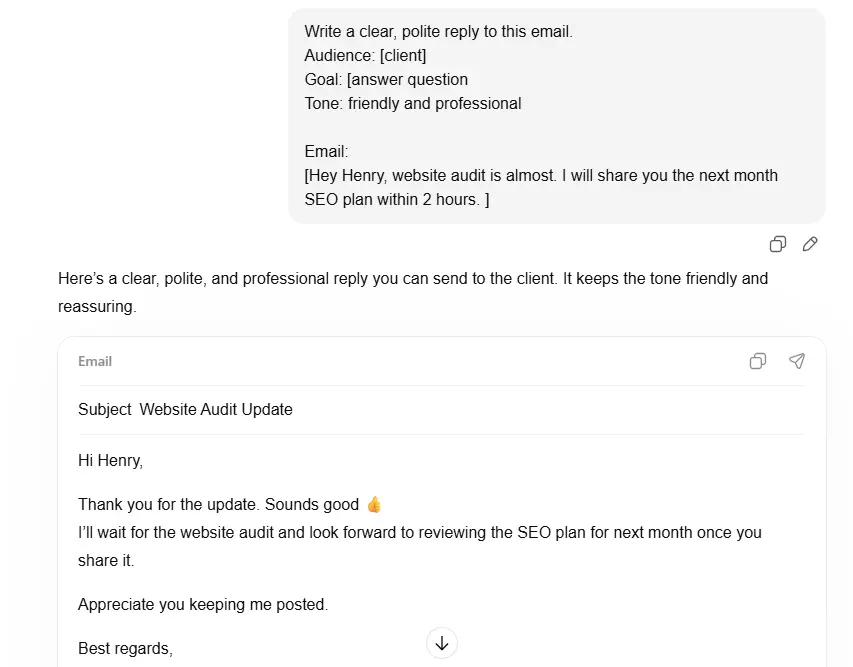
Example of a clear and professional email reply writing format showing audience, goal, tone, and a polite client response inside an email editor

Write a clear, polite reply to this email.

Audience: [client / boss / customer]

Goal: [answer question, confirm, say no]

Tone: friendly and professional

Email:

[PASTE EMAIL]

2. Subject Line Generator

Write 5 clear subject lines for this email.

Audience: busy professional

Style: short and specific

Email:

[PASTE EMAIL]

3. Change Tone
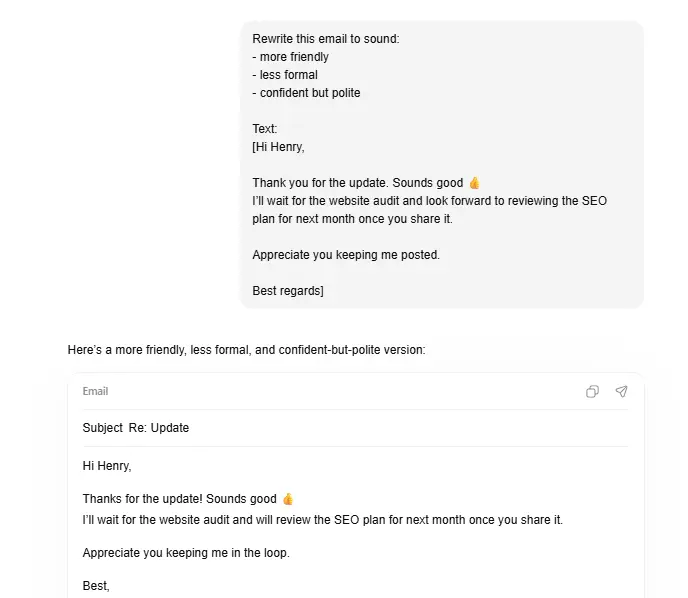
AI tool interface showing how to rewrite an email to sound more friendly, less formal, and confident but polite, with before and after email examplesRewrite this email to sound:

– more friendly

– less formal

– confident but polite

Text:

[PASTE EMAIL]

4. Follow-Up Email

Write a short follow-up email.

Context: sent 5 days ago, no reply

Tone: polite, not pushy

Goal: get a response

Original email:

[PASTE EMAIL]

Email Writing Workflows (Manual + Automated)

Gmail Workflow (Safe & Simple)

  1. Draft your email in Gmail
  2. Copy it into ChatGPT
  3. Improve tone or clarity
  4. Paste back and review
  5. Send manually

Tip: Never connect ChatGPT directly to Gmail auto-send features.

Outlook Workflow

  • Same copy–paste method
  • Use ChatGPT for:
    • Subject lines
    • Meeting confirmations
    • Client updates

Many Outlook add-ins exist, but manual review is safer.

Zapier / Make (Advanced, With Care)

Use automation only for drafting, not sending.

Safe setup:

  • Trigger: New support ticket or form
  • Action: Generate draft with ChatGPT
  • Human reviews → manually sends

This avoids privacy and compliance issues.

Email Templates (Ready to Use)

1. Cold Outreach

Example of a cold outreach email template with subject “Quick question about [company]” used for business prospecting and lead generationSubject: Quick question about [company]

Hi [Name],

I came across [specific detail] and thought I’d reach out.

We help [type of business] with [clear benefit].

If this is relevant, happy to share more.

If not, no worries at all.

Best,

[Your Name]

2. Follow-Up

Hi [Name],

Just checking in on my message below.

Happy to answer questions or reconnect later if now isn’t a good time.

Best,

[Your Name]

3. Meeting Booking

Hi [Name],

Would you be available for a 20-minute call this week or next?

I’m free [2–3 time options].

Looking forward to it,

[Your Name]

4. Apology Email

Hi [Name],

I’m sorry for the delay/confusion earlier.

That’s on me, and I appreciate your patience.

Here’s the update: [solution or next step].

Thanks,

[Your Name]

5. Customer Support Reply

Hi [Name],

Thanks for reaching out.

I understand the issue, and I’m happy to help.

Here’s what you can do next: [clear steps].

If you need more help, just reply.

Best,

[Support Name]

Prompt Engineering (Beginner-Friendly)
A team working on a laptop displaying AI prompt engineering concepts, with charts and documents on a wooden desk, showing collaboration and beginner-friendly prompt engineering workflowBetter input = better output.

Always include:

  1. Original email 
  2. Who it’s for 
  3. Your goal 
  4. Desired tone 

Bad Prompt 

“Fix this email”

Good Prompt

Rewrite this email.

Audience: upset customer

Goal: calm them and explain delay

Tone: empathetic and professional

Email:

[TEXT]

Mini Case Study: Before & After

Raw Draft

“Sorry for the delay. We were busy. Your issue should be fixed now.”

ChatGPT-Improved

“Thank you all for your patience, and sorry about the delay

We had more requests than usual. Your problem has been addressed now.

I would appreciate you letting me know if any other concerns arise.”

Result: Same message, more trust, less friction.

Tools & Plugins (Know the Risks)

Popular tools:

  • ChatGPT Writer 
  • Outlook AI add-ins 
  • Gmail extensions

Risks to watch:

  • Full inbox access 
  • Auto-sending emails 
  • Storing sensitive data 

If an application has the potential to send emails without review, do not use it.

Ethics, Privacy and Safety (Significant)

  • Don’t paste confidential data 
  • Don’t auto-send AI emails 
  • Always review before sending 
  • Follow GDPR and company policies

As business specialists always advise, AI should help people not take over judgment. Consider it as a tool for drafting and not for decision-making.

Troubleshooting Common Problems

Output sounds robotic?

Prompt fix:

Rewrite this to sound natural and human.

Short sentences. Plain language.

Wrong facts?

Prompt fix:

Do not add new facts.

Only rewrite what’s already stated.

Does the tone feel off?

Prompt fix:

WRITE AGAIN with a warmer, EXTRA conversational tone.

Conclusion

ChatGPT doesn’t replace your voice—it helps you find it faster.

For small business owners, managers, and busy professionals, it turns email from a daily burden into a quick task. Start small: rewrite a single email today. With the correct prompts & safe workflows, you’ll write clearer, faster, & more confident emails without losing the human touch.

FAQs (Quick Answers)

Can ChatGPT write emails for work?

Yes, as a drafting and editing assistant.

Is it safe for business emails?

Yes, if you avoid sensitive data and review before sending.

Will recipients know it’s AI-written?

Not if you edit lightly and keep language simple.

Can I automate emails fully?

Drafting only. Always keep a human review.

Is ChatGPT the best for beginners?

Yes—easy prompts work very easily.

Ayaz Saifi

Ayaz Saifi

Ayaz Saifi Butt is a digital marketer, tech enthusiast, and founder of TechAiTech, where he explores the fast-changing world of technology, AI, machine learning, and modern digital trends. With hands-on experience across SEO, content strategy, digital growth, and AI-driven tools, Ayaz focuses on creating clear, useful, and practical content that helps people understand technology in a simple way. He researches how AI is reshaping search, marketing, business operations, and everyday digital experiences—making complex ideas easy to grasp for a general audience. Ayaz enjoys testing new software, exploring tech innovations, analyzing gadgets, and studying how future technologies impact businesses. Through TechAiTech, he aims to build a trusted space for tech learning, honest reviews, and practical insights for readers worldwide.

Next Post
A laptop on a wooden desk showing an API interface screen, surrounded by a notebook, phone, and coffee mug – symbolizing how APIs connect different software tools, ideal for a beginner-friendly blog on APIs for non-programmers.

Understanding APIs: A Guide for Non-Programmers

Recommended.

HDIntranet employee login screen concept showing secure corporate intranet dashboard on a laptop

What Is HDIntranet? Complete Guide to hdintranet.com, Login Access, and Safety

January 30, 2026
Alt Text: A digital marketer using AI tools on a laptop to automate and optimize email marketing campaigns in 2026, with email analytics dashboard and AI interface on screen

How to Use AI for Email Marketing Campaigns: A Step-by-Step Guide (2026)

April 13, 2026

Trending.

What is the Difference Between AI and Machine Learning?

What is the Difference Between AI and Machine Learning?

March 23, 2026
Split graphic comparing Coursera and Udemy logos with bold text reading "Coursera vs Udemy – Beginners Guide", highlighting a visual contrast between the two online learning platforms for a 2026 blog article.

Coursera vs Udemy for Beginners (2026): Which Should You Choose?

January 18, 2026
ChatGPT vs Claude for Coding: Which Is Better for Python Beginners

ChatGPT vs Claude for Coding: Which Is Better for Python Beginners?

February 8, 2026
Young woman sitting on a couch at home checking her affordable fitness smartwatch connected to a tablet, demonstrating budget smartwatch tracking features like heart rate and workout monitoring.

Best Affordable Smartwatches for Fitness Tracking (2026 Guide)

February 21, 2026
A determined female self-taught data scientist working at a home desk with a 2025 roadmap whiteboard, Python code on a monitor, and data visualization projects.

How to Become a Data Scientist Without a Degree — Step-by-Step Roadmap & Portfolio Plans

March 4, 2026
Tech AI Tech

TechAiTech is a modern tech publication covering Technology, AI, Gadgets, Software, Digital Marketing, Business Tech, and EdTech. We share simple guides, honest reviews, and clear insights to help readers stay updated and make smart tech decisions.

Follow Us

Categories

  • AI (Artificial Intelligence)
  • Business
  • Digital Marketing
  • EdTech
  • Gadgets
  • News
  • Reviews
  • Software
  • Technology

Recent News

A digital marketer writing SEO-optimized meta descriptions on a laptop with Google search results visible on screen, showing click-through rate analytics in 2026

How to Write a Meta Description That Increases Clicks: A Complete Guide (2026)

April 17, 2026
Alt Text: A digital marketer using AI tools on a laptop to automate and optimize email marketing campaigns in 2026, with email analytics dashboard and AI interface on screen

How to Use AI for Email Marketing Campaigns: A Step-by-Step Guide (2026)

April 13, 2026
  • About Us
  • Contact Us
  • Write for Us
  • Privacy Policy
  • Terms & Conditions

© 2025 MDOFS - All rights reserved Tech AI Tech.

No Result
View All Result
  • Home
  • About Us
  • Technology
  • AI (Artificial Intelligence)
  • Digital Marketing
  • EdTech
  • Business
  • Software
  • Contact Us
  • Write for Us
  • Terms & Conditions
  • Privacy Policy

© 2025 MDOFS - All rights reserved Tech AI Tech.